.png?height=120&name=sonovate%20logo%20copy-01%20(1).png)
Everything you to know about our Ltd Deductions solution
- Ltd Deductions set up
- Placement checklist
- How to add a Ltd Deductions placement
- New starters
- Timesheets
- Payslips
- Leavers
- HMRC
- Queries
- Payments
- Reports
Ltd Deductions set up
What are the steps we need to go through to setup our account ready to fund Ltd Deduction placements?- Register with HMRC PAYE scheme
- Complete Sonovate’s new agency form
- Find out more here
- Sonovate can set up a scheme for your business for a fee - please contact paye@sonovate.com for a quote.
Why do we need to register with HMRC’s PAYE scheme?
-
It's a legal requirement to be enrolled in HMRC’s scheme. However, it's nothing to be worried about. Being registered ensures your tax affairs are kept neat and tidy
How long does the registration process take?
- It can take up to five working days for HMRC to respond, so we recommend getting this set up 1-2 weeks before you want to fund a Ltd Deductions placement through your account.
Why do I need to complete Sonovate's 'new agency form' as well?
- HMRC require different information to Sonovate. The details you provide on our form ensures your account is setup perfectly to fund Ltd Deductions placements.
Placement checklist
Everything you need to add a placement into your account with ease
How to add an LTD Deductions Placement
Step one: add client information
Step two: add candidate information
Step three: add role information to the placement
At a glance process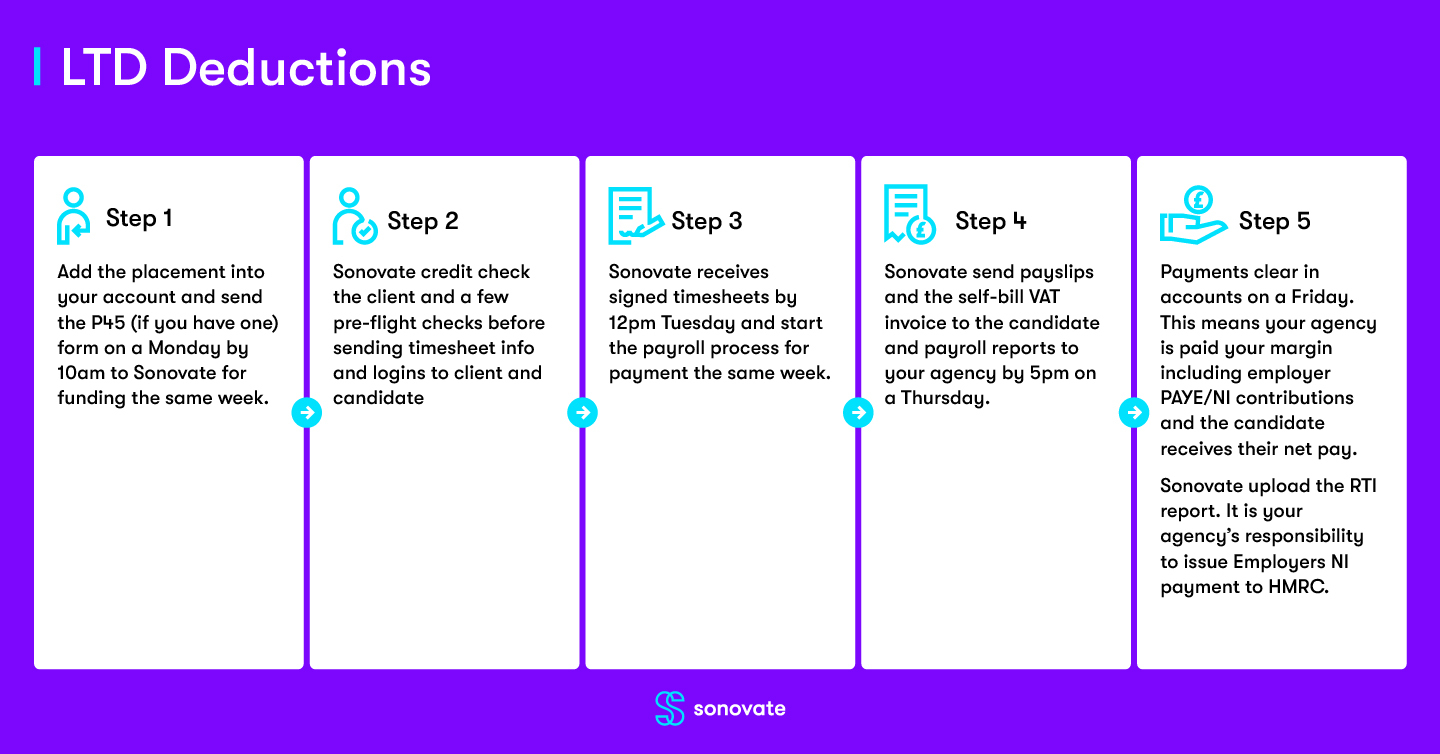
New starters
Do I need to setup a new starter?
- The candidate will need to complete HMRCs PAYE Starter Checklist form. See below for form options:
- And, a copy of their P45 if applicable
Do I complete the new starter form for every candidate?
-
Yes.
What do I do with the New Starter Information?
- When submitting your PAYE placement, you will be asked to populate the contents of the HMRC PAYE Starter checklist form when inputting your candidate details.
- If you have a P45 for your candidate, you will need to send this to paye@sonovate.com Without the P45 your candidate may be processed on an emergency tax code.
Timesheets
- Sonovate needs to receive signed timesheets by 12pm on a Tuesday.
- If the deadline of Tuesday 12pm is missed, the candidate will be paid the following Friday's pay run.
Payslips
When will the candidate(s) receive their payslip?
- Payslips will be emailed to the candidate(s) by Thursday 5pm.
- A password will be sent to the candidate(s) with their first payslip from Sonovate.
- The password will be the candidate's NI number. For e.g. QQ123456C
- The payslip for Ltd Deductions will detail the candidate’s take home pay amount (Gross less deductions and including VAT if they are VAT registered).
Leavers
What is the process when a candidate leaves my agency?
- Firstly, please end the placement early on the portal on the last day the candidate works. To do this, enter the placement record and click 'finish early'.

- Then, please email paye@sonovate.com to let us know whether Sonovate need to organise holiday pay and a P45.
HMRC
Who is responsible for making payments to HMRC?
- Your agency is responsible for making sure payments are sent to HMRC each month.
- Sonovate will issue a P30 to you at the end of each tax month which instructs you the amount that needs to be paid, and where to pay it and how to reference it.
What's the deadline for payments?
- The payment deadline for each month is the 19th.
Queries
Where do I send my queries and amendments to be made?
- All queries and amendments to be sent to customerservices@sonovate.com
- The team will action queries in line with our shared SLA
Payments
- Sonovate will issue the candidate’s pay as usual.
- Sonovate will issue you your agency margin (including Employers NI) as usual.
- It is your agency’s responsibility to pay deductions to HMRC.
Reports
When and how will my agency receive the PAYE summary report?
- When: Each Thursday
- How: You’ll receive an email with a PDF attachment containing a full PAYE summary report for that week.
Example of report summary:
